A room-by-room calendar, front desk and housekeeping built for properties with several rooms — not just a single unit. Same login as Vista, same account, no separate tool to learn.
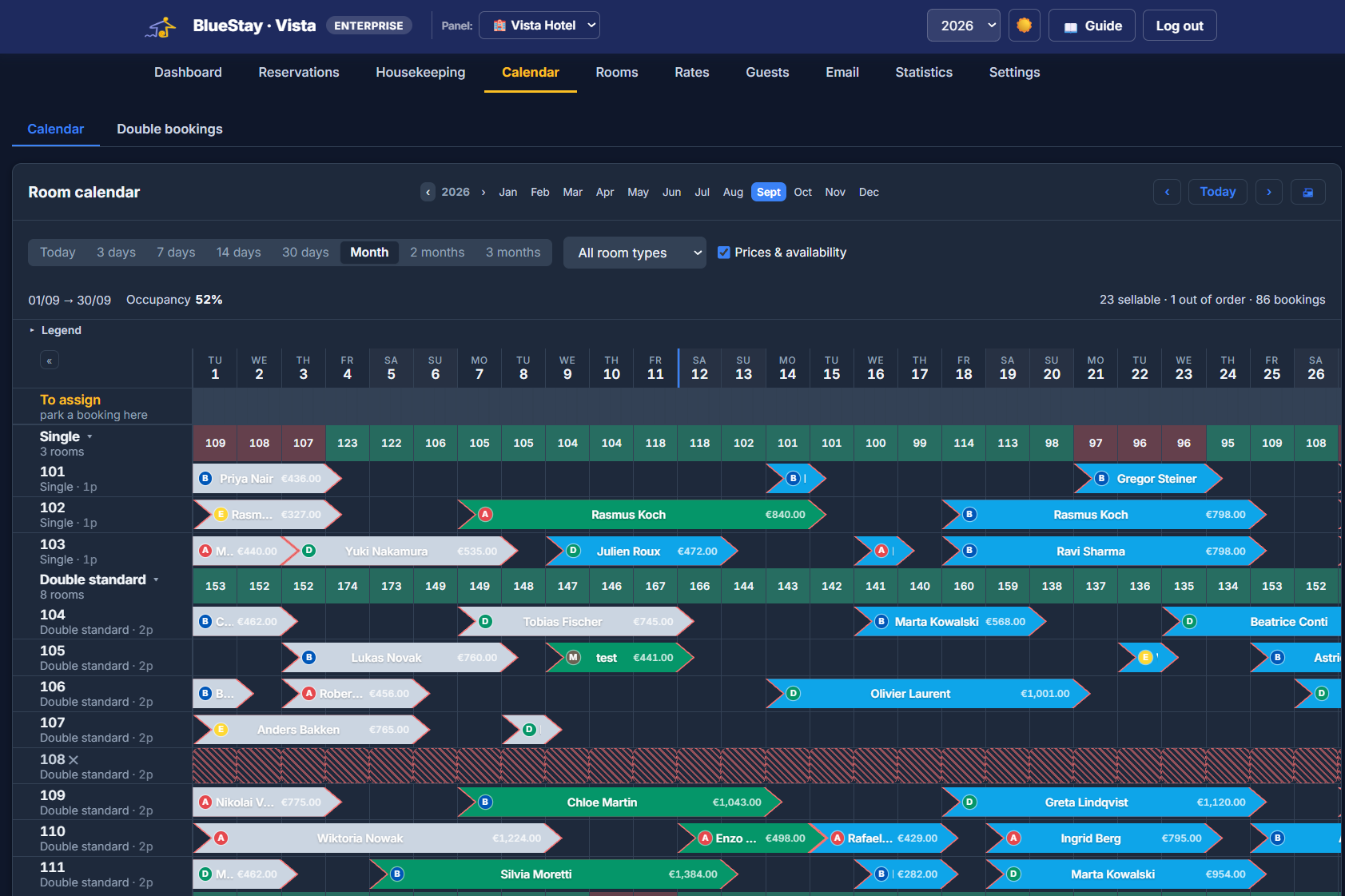
Regular Vista tracks whole properties — great for houses and apartments. Vista Hotel adds everything a desk needs on top: a room-by-room calendar you can drag bookings around, check-in and check-out, housekeeping with its own staff logins, payments, guest emails and the numbers hoteliers actually quote — ADR, RevPAR, occupancy. For hotels, guesthouses and B&Bs with multiple rooms under one roof.
Every room on its own row, every booking a bar you can grab — drag it to another room or another date, pull its edge to extend the stay, or drag across free nights to create one. From three days to two months in view, whichever suits the question you’re asking.
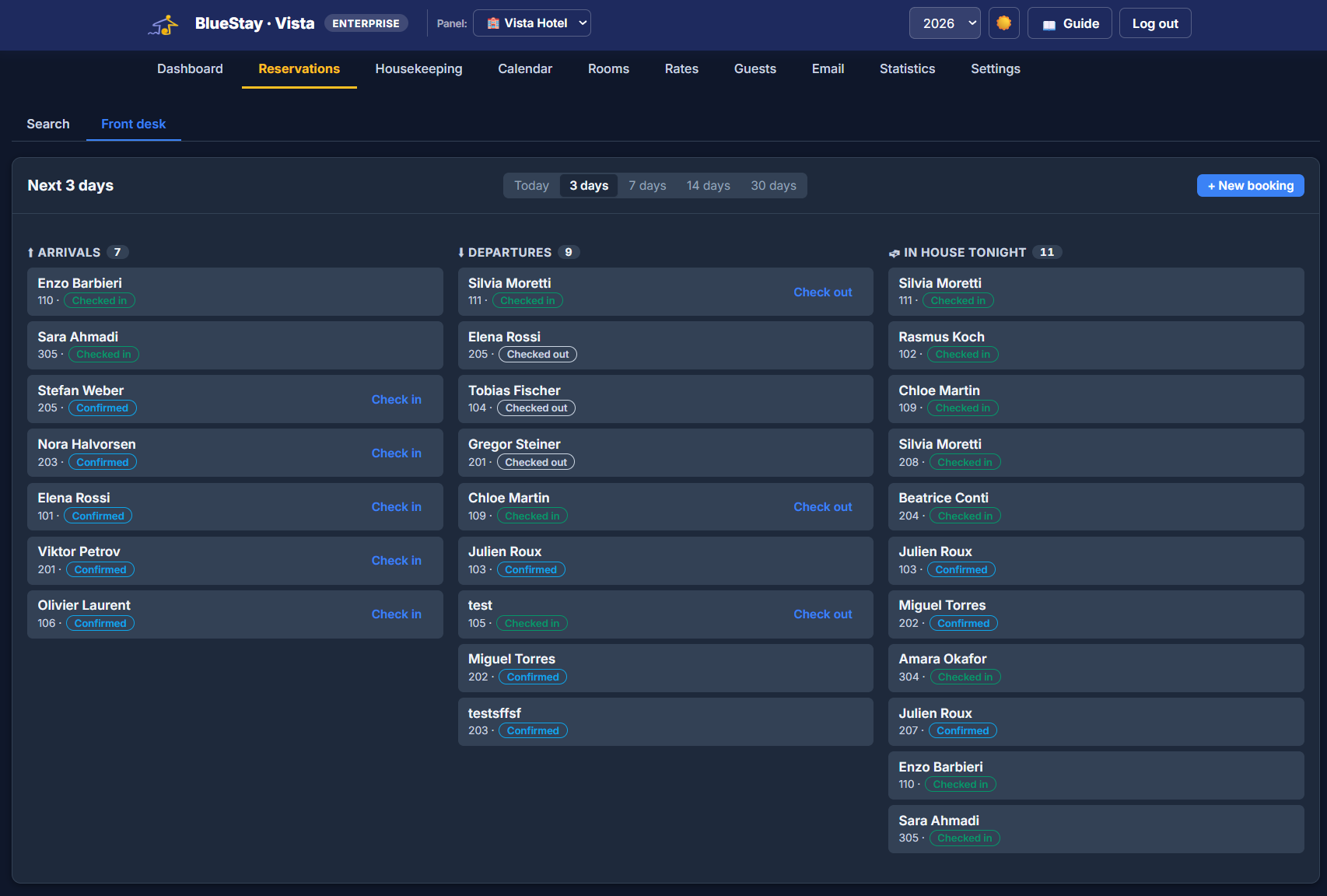
Check guests in and out, take walk-in bookings, generate quotes on the spot and see live room status — clean, dirty, occupied, out of order — all from one screen built for the reception desk.
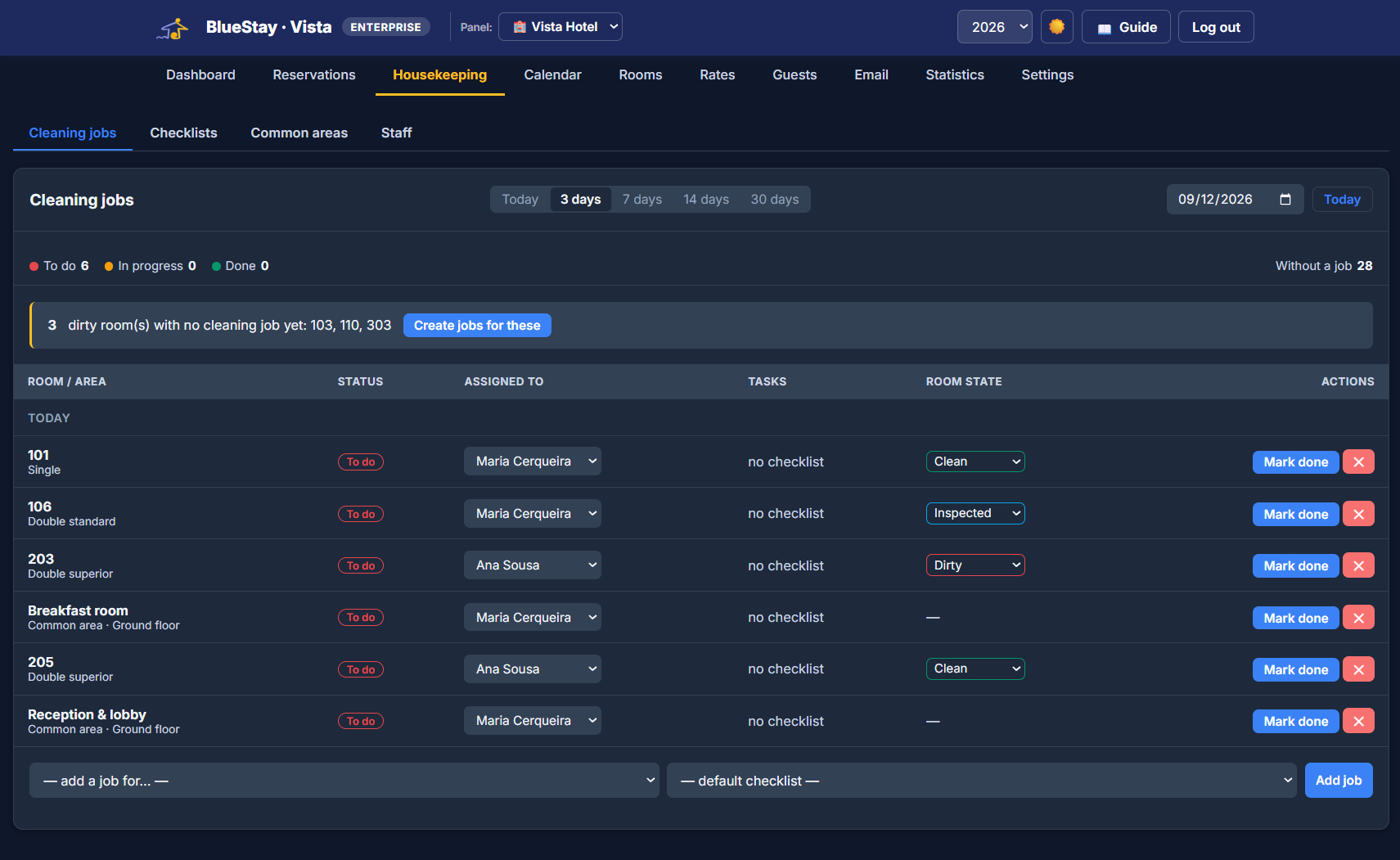
Every checkout queues a cleaning job by itself. Build the morning’s round in one gesture, assign rooms to the people who clean them, and let each of them open Vista Hotel to find their own list — and nothing else.
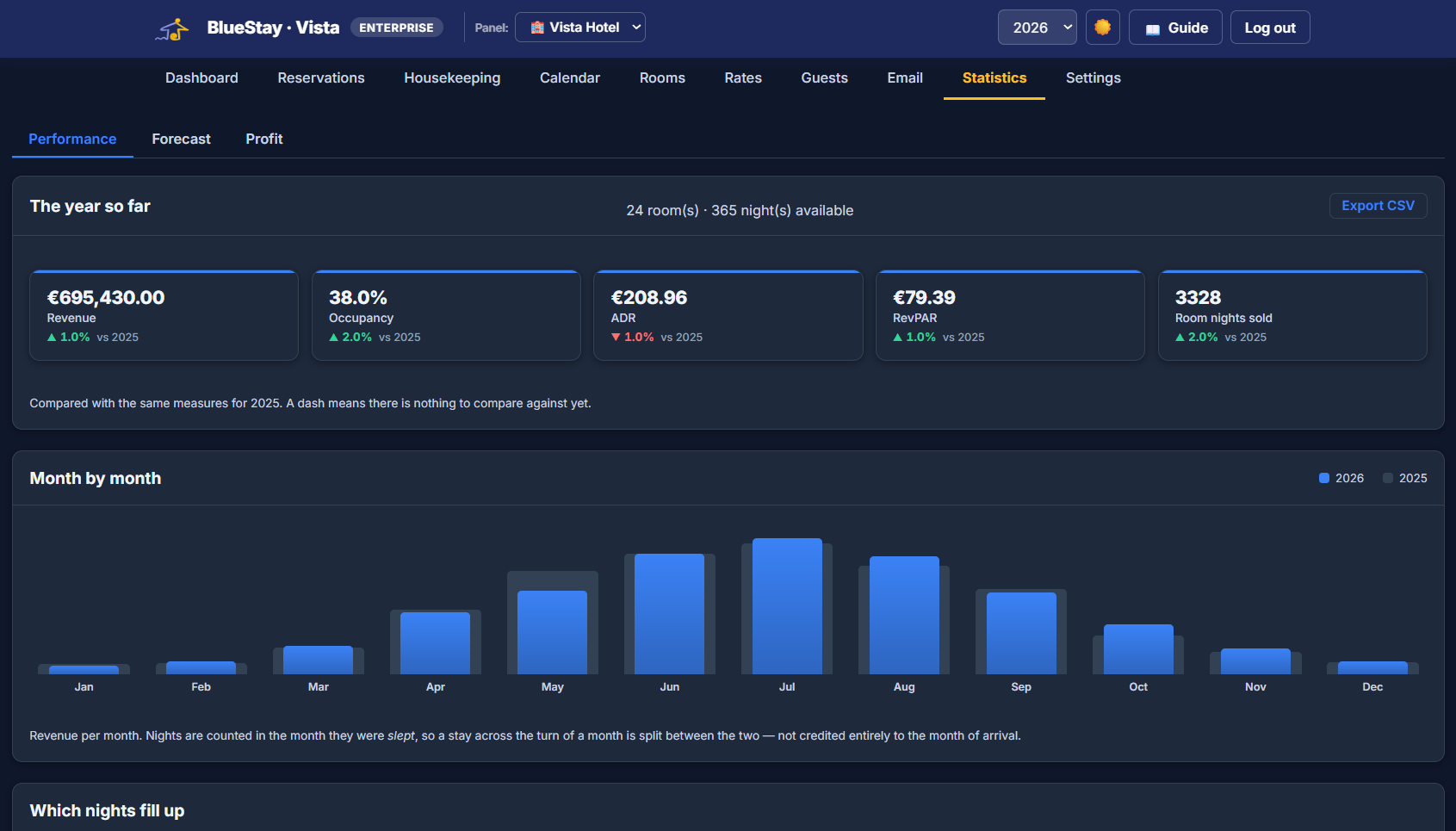
Set nightly rates per room, handle city/tourist tax per stay or per guest, and see occupancy, RevPAR and revenue rolled up across every room — or your whole portfolio, houses and hotel rooms together.
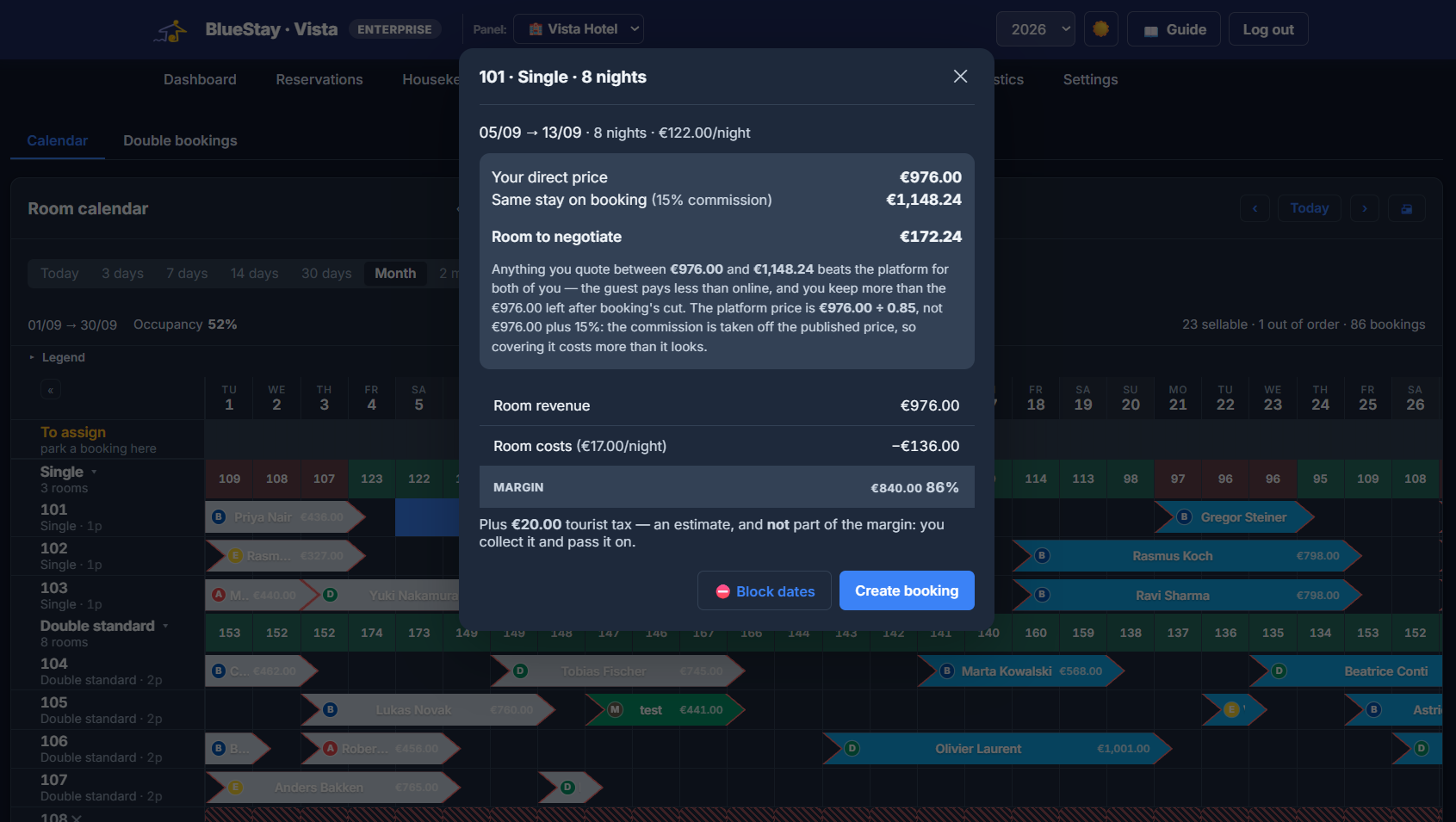
The phone rings and you have seconds to answer well. Vista Hotel shows you two numbers at once: what you would charge direct, and what the same guest would pay for that room on Booking. Quote anything in between and you both win — the guest pays less than online, you keep more than the platform would leave you.
The detail that matters: commission comes off the published price, not your net. To keep €100 with 15% commission, the platform price is not €115 — it is €117.65. Vista Hotel does that division for you, because doing it in your head is how you quote the wrong number.
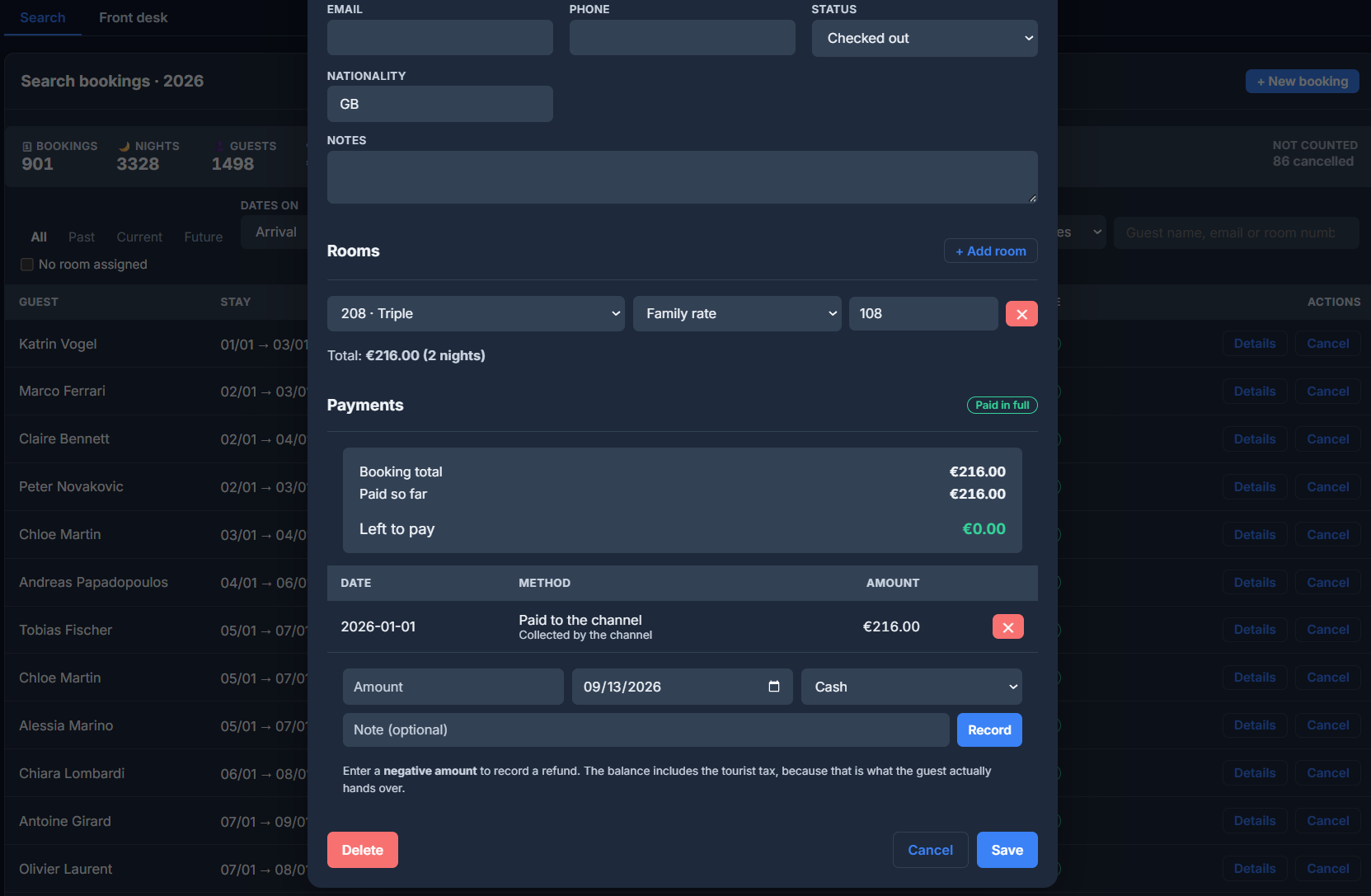
A deposit in May and the balance on arrival are two different facts, with their own dates and methods. Vista Hotel records them as movements, not as one “already paid” box that forgets the deposit the moment you type the balance — and a refund is simply a negative amount.
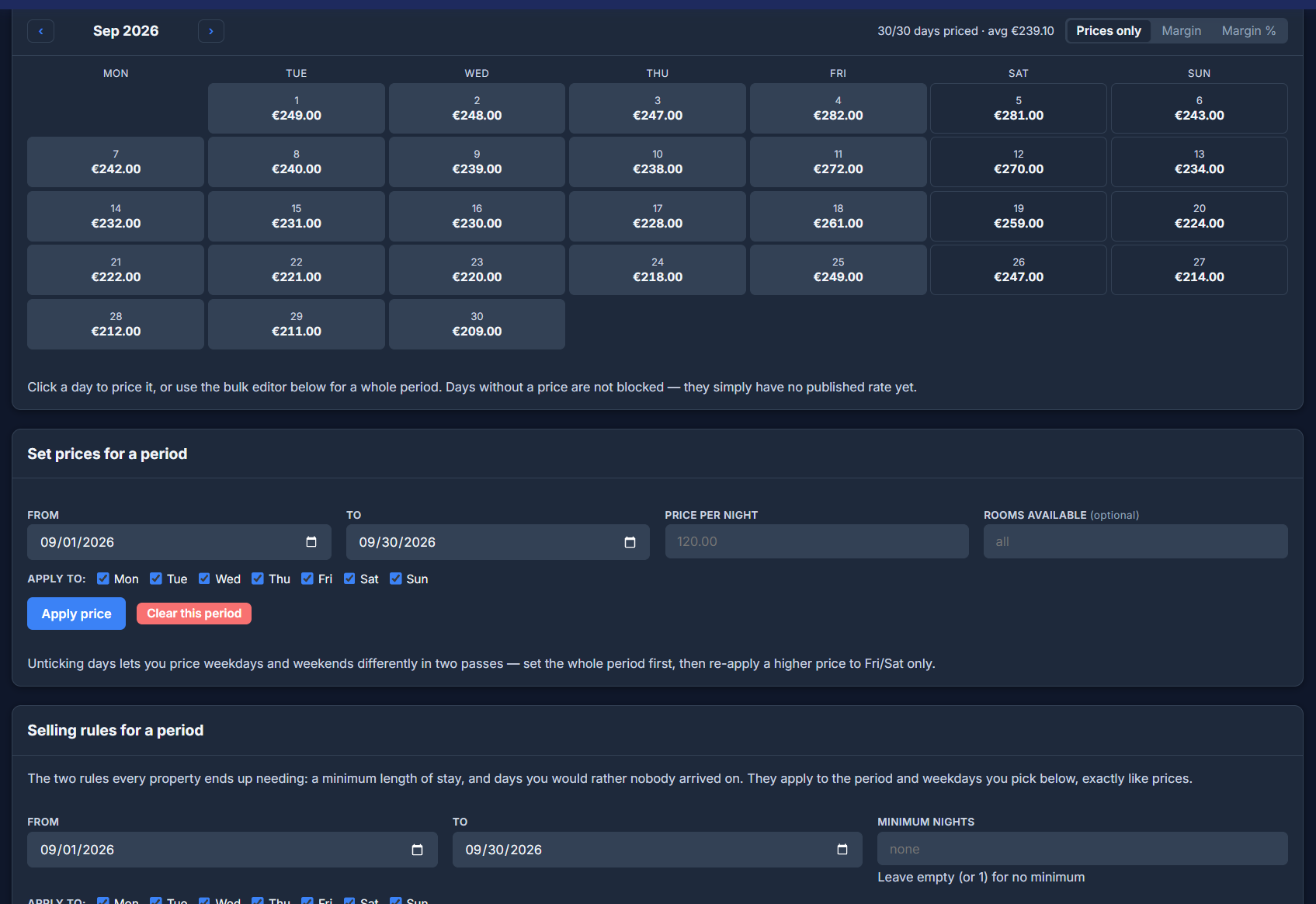
Price a whole month in one pass, then go back over Fridays and Saturdays with a higher rate. Set the two rules every property ends up needing — a minimum stay, and days you would rather nobody arrived — and switch the grid from prices to margin to see what each night actually leaves you.
Rules warn, they do not block. At the desk you make exceptions all the time — the regular guest, the gap between two stays. Vista Hotel tells you a booking breaks a rule and lets you decide, instead of forcing you to switch the rule off and hope you remember to switch it back.
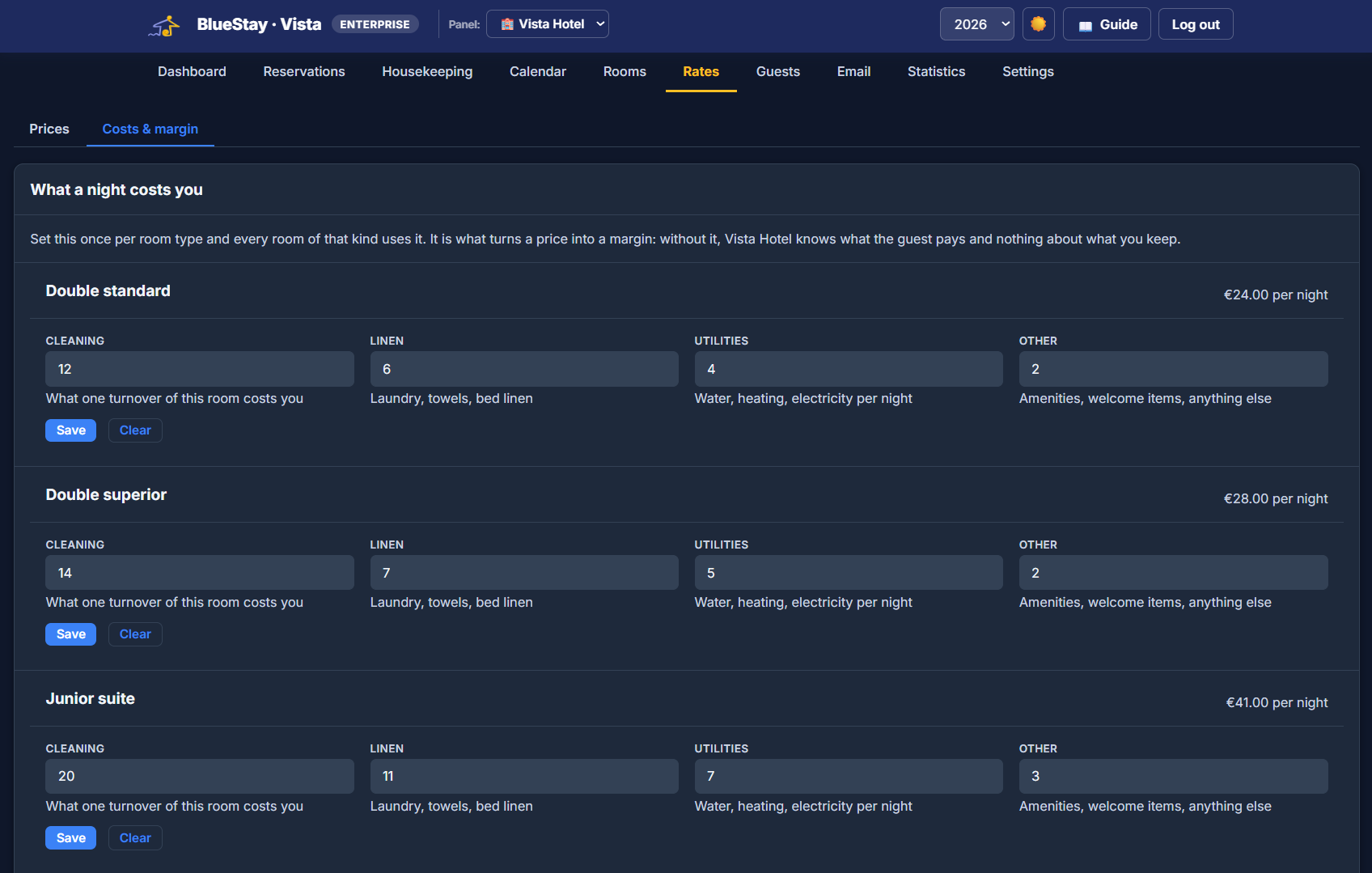
A price on its own does not tell you much. Set what one night of each room type costs — cleaning, linen, utilities, anything else — and every price in the system turns into a margin you can actually read. Running costs like rent and wages sit alongside, counted against the season rather than smeared over each night.
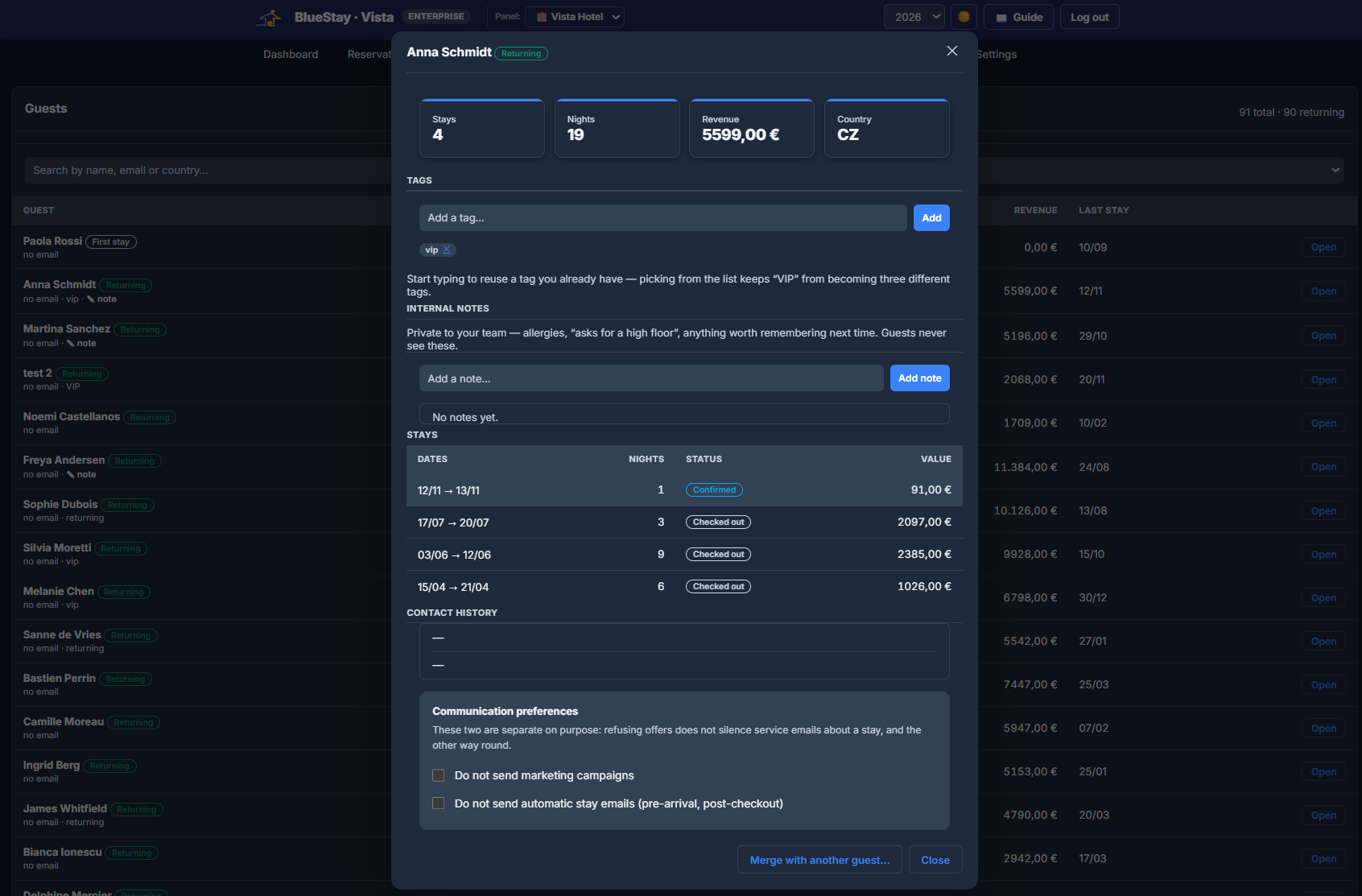
The same guest often arrives written two ways — a CSV import spells it differently from an iCal feed, a typo splits one person into two records. Vista Hotel matches stays automatically and, when two profiles turn out to be the same guest, lets you merge them into one — told exactly what will happen before you confirm, because it moves real history and cannot be undone.
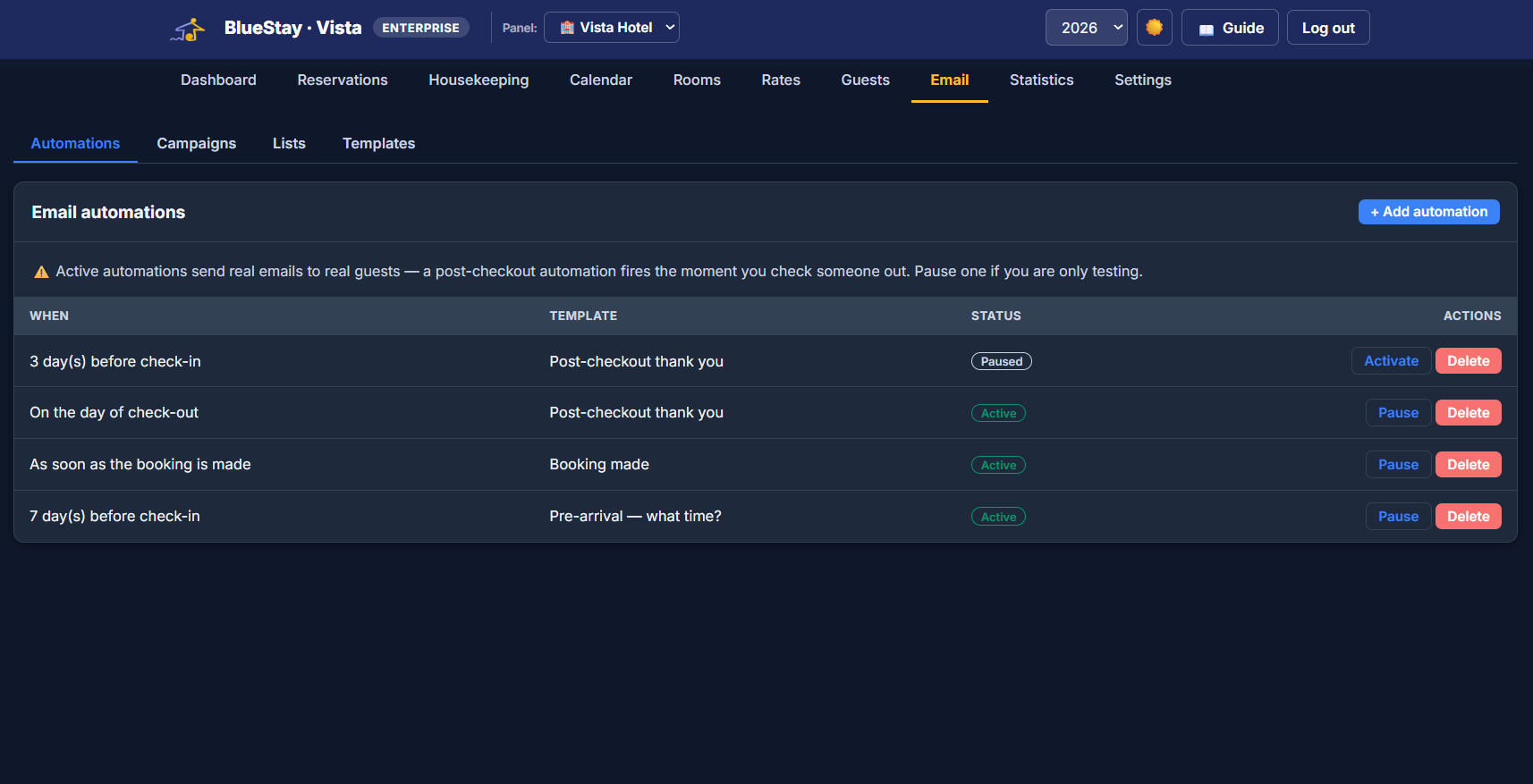
A booking confirmation, a note seven days before arrival asking what time they will get in, a thank-you the day they leave. Write them once and they go out by themselves. Then, when you want to fill a quiet week, send a campaign to the guests who already know you.
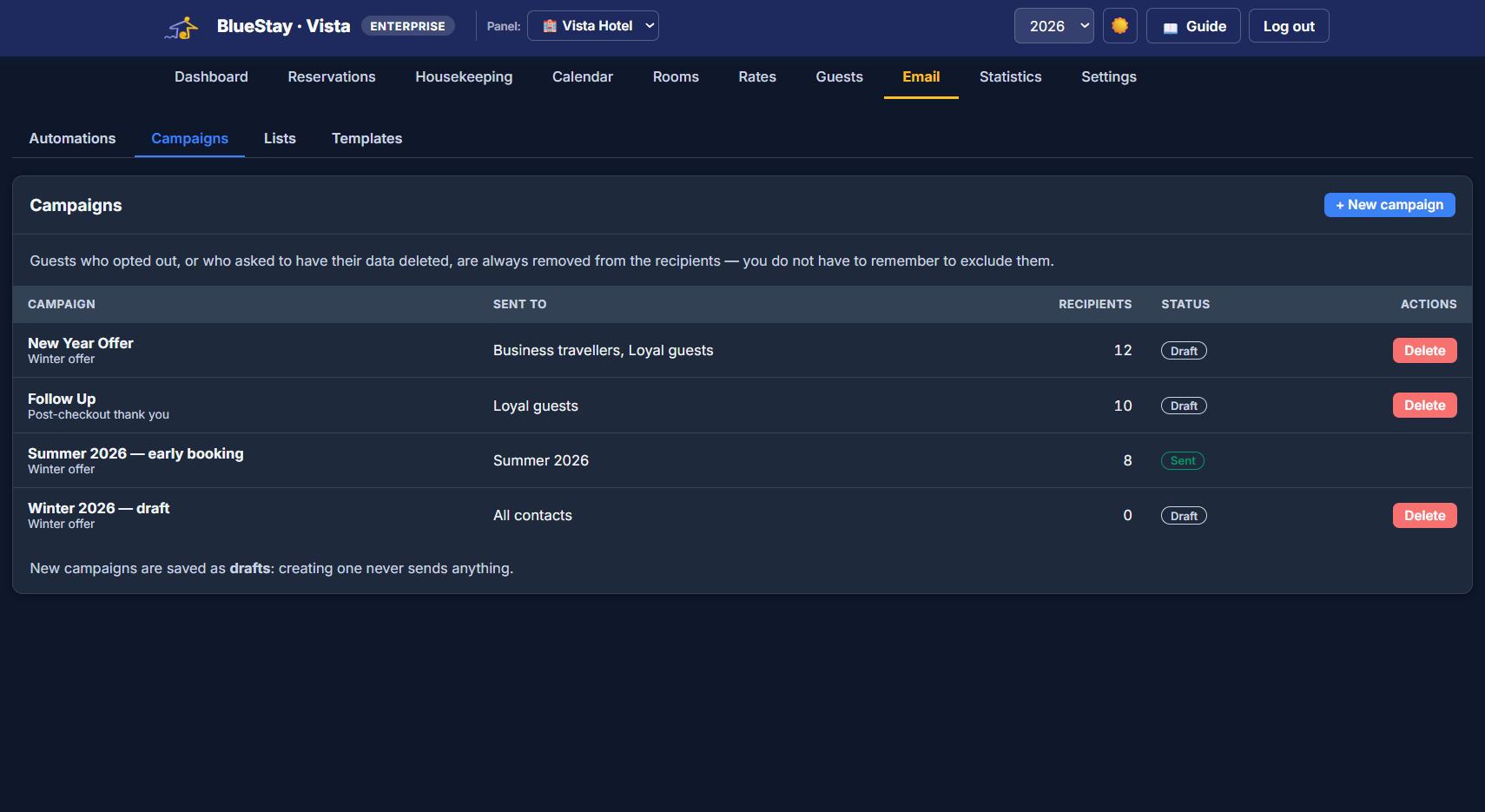
Opt-outs are not your job to remember. Guests who unsubscribed, or asked to have their data deleted, are removed from the recipients before you press send — it is not a filter you can forget to apply.
The people who stayed with you are the cheapest bookings you will ever get. Build a list — business travellers, loyal guests, last summer’s arrivals — pick a template, and see exactly how many people it is going to, and how many were left out and why, before anything leaves.
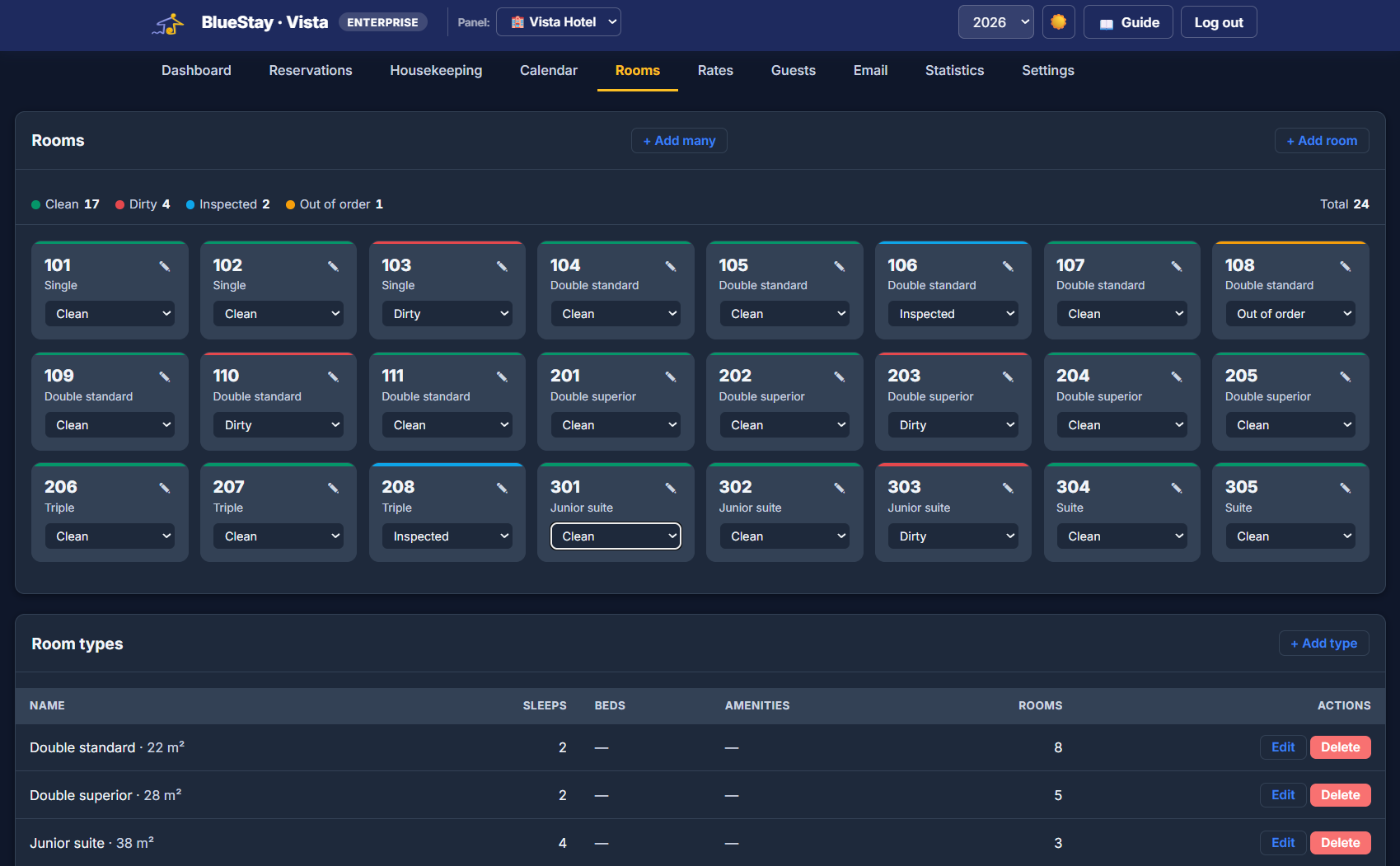
The whole property on one screen, colour-coded: clean, dirty, inspected, out of order. Change a state from the dropdown on the card — and note that out of order is a real decision, not a passing shade: that room stops being sellable and leaves the occupancy figures until you bring it back.
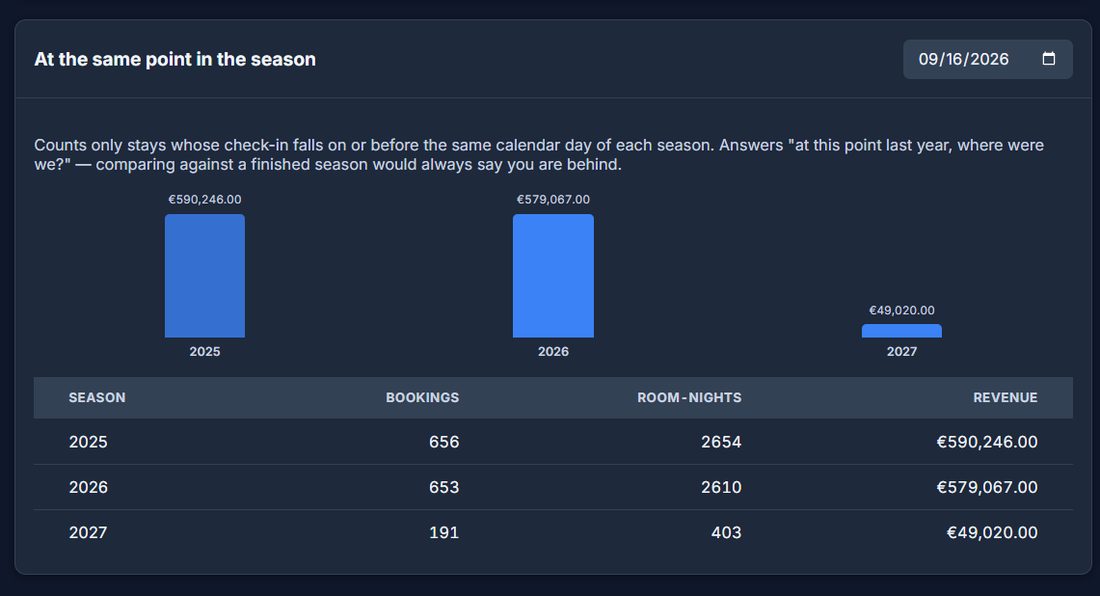
Every season you have recorded, side by side. And the comparison that actually settles an argument in mid-season: at the same point in the year — only the stays booked by the same calendar day of each season, because measuring a year still running against one already finished will always say you are behind.
Why it matters: "we are down on last year" is the most expensive sentence in a hotel if it is not true. Compared at the same date, a season that looked weak often turns out to be ahead.
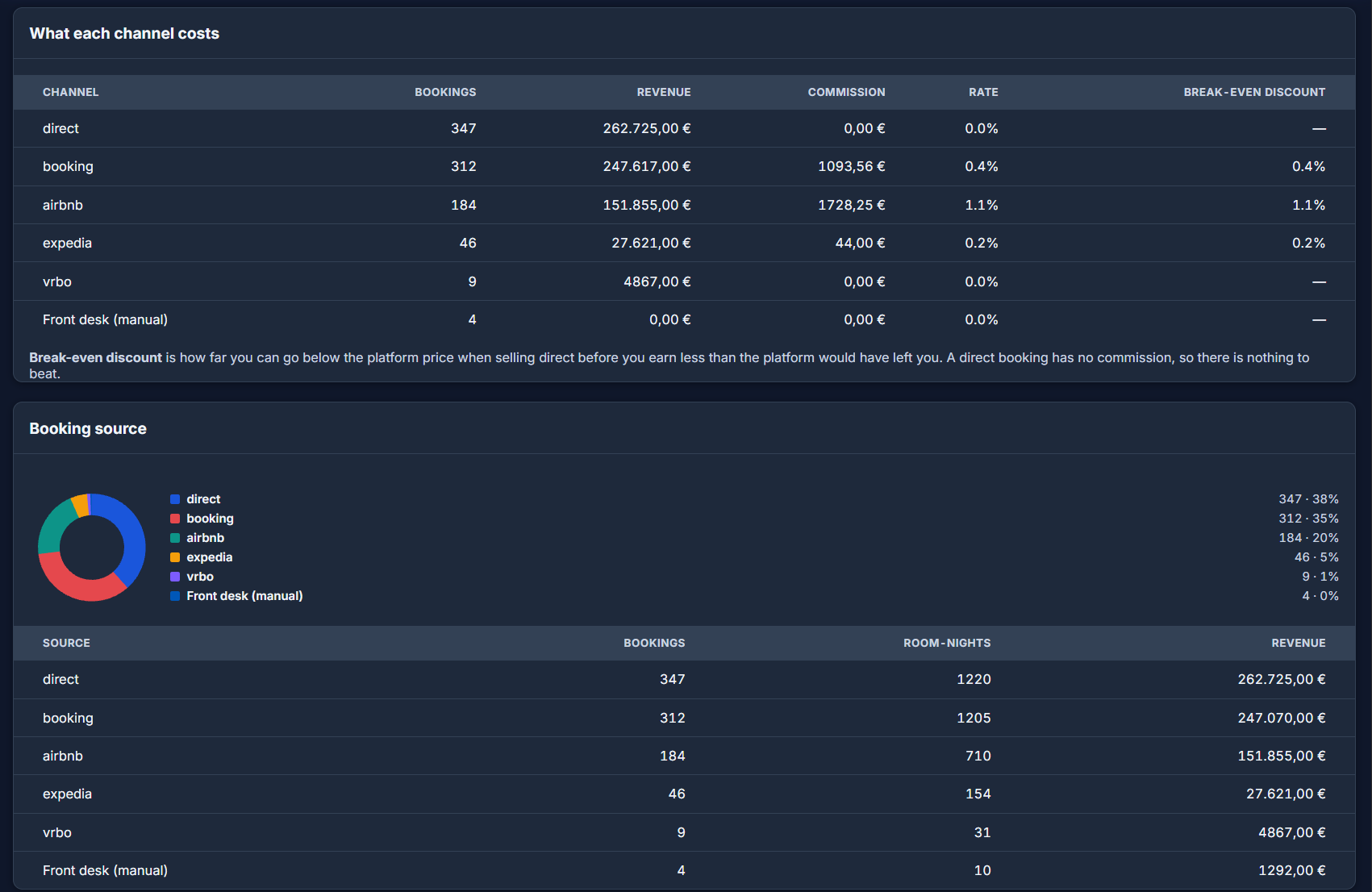
Not the percentage in the contract — the one you actually paid, measured on real money: bookings that carried no commission, different deals inside the same channel, all of it. Then the number nobody works out: how far you can discount a direct booking before you earn less than the platform would have left you.
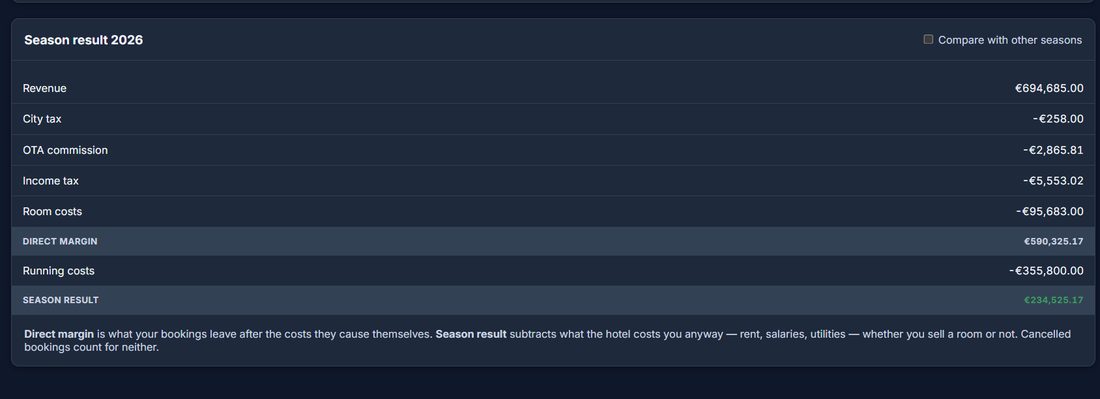
Revenue, tourist tax, commission, income tax, room costs, running costs — down to one figure. Rent and salaries are kept out of each booking's margin on purpose: spreading them across every night would be a guess that moves with your occupancy, and one quiet week would make every booking look unprofitable.
The useful part: direct margin and season result can point in opposite directions. Every booking profitable while the season still loses money tells you the problem is volume or fixed costs — not your prices.
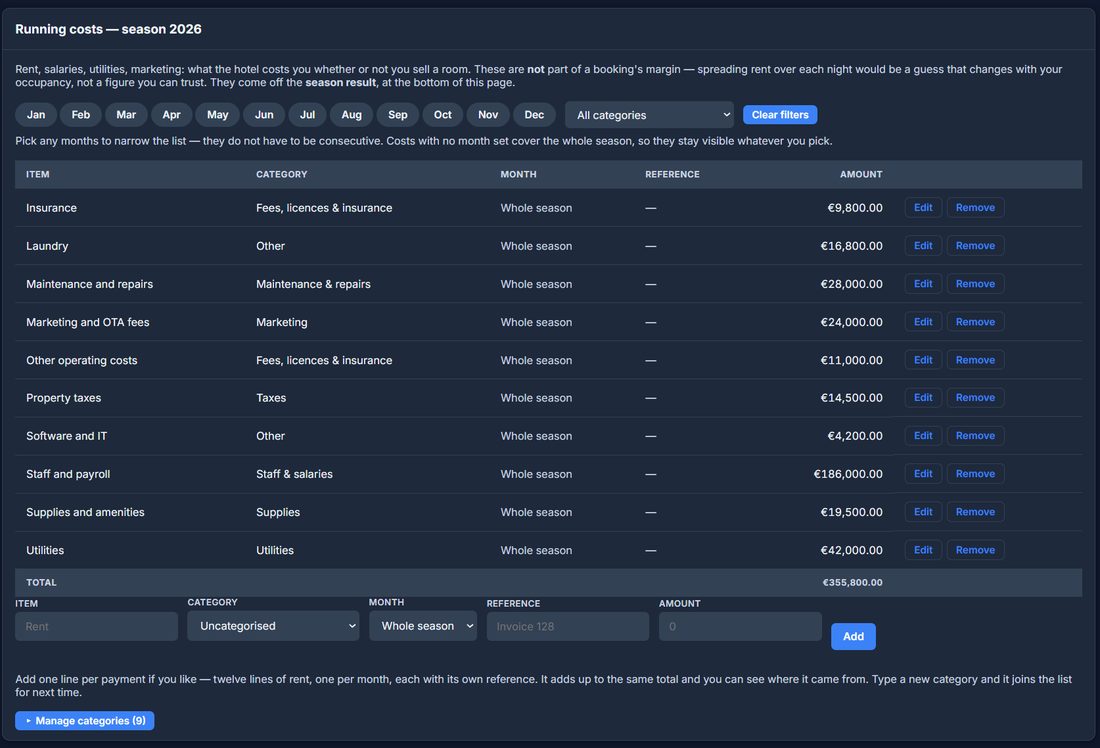
Rent, salaries, utilities, insurance: one line per payment if you like, each with its own month and reference. Categories are yours — rename the ones that came with the program, add your own, remove what you do not use. Nothing is set in stone: every cost can be edited after the fact.
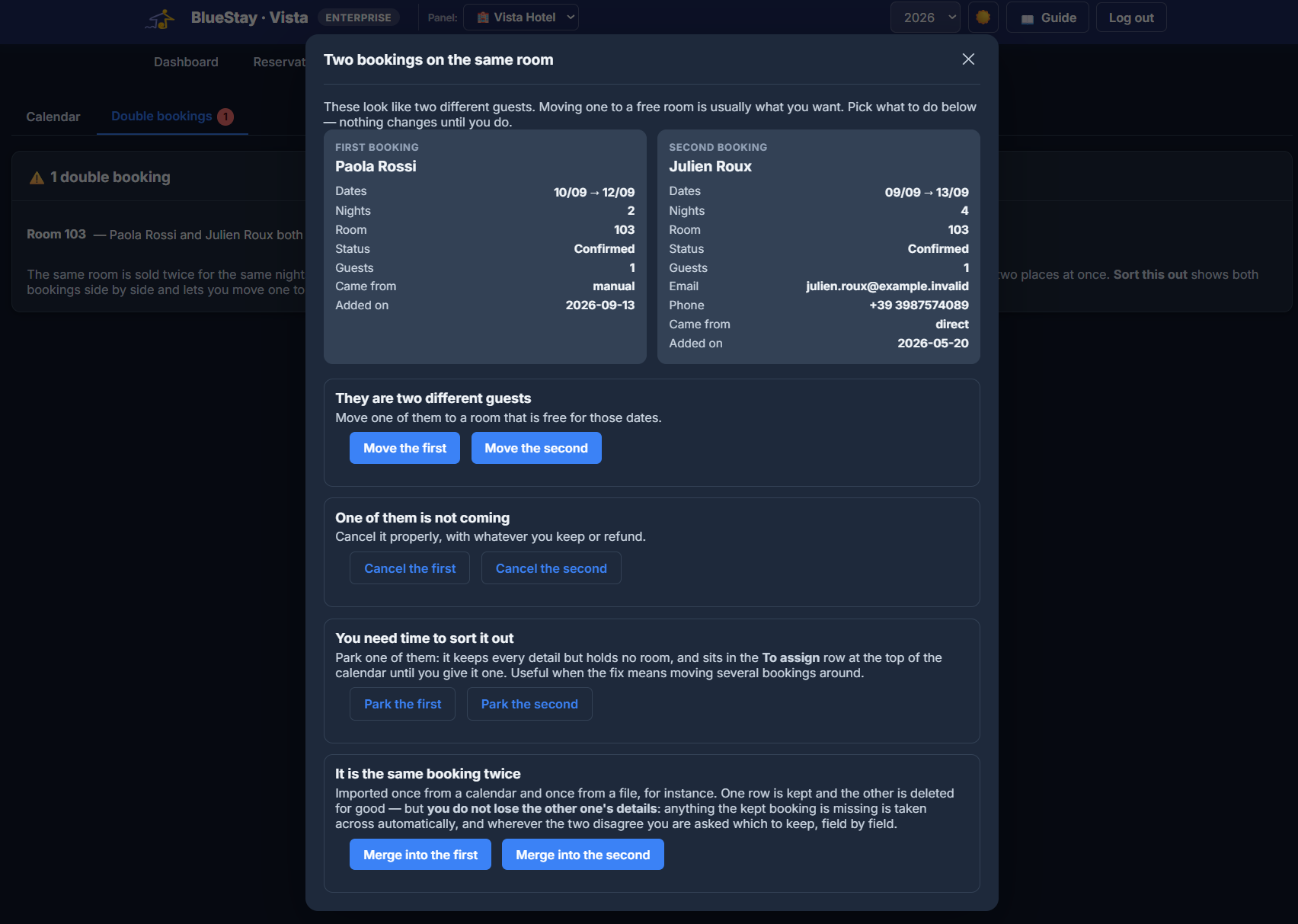
It happens — an iCal feed arrives late, someone types a booking while the phone is ringing. Most systems tell you there is a clash and leave you there. Vista Hotel puts both bookings side by side and gives you the four ways out, spelled out in words rather than jargon.
A hotel system is also the boring things: who can see what, what happens if a laptop is lost, and whether you can get your data out on a Tuesday afternoon.
Reception, housekeeping, accountant, manager — each role scoped by category: bookings, rooms, housekeeping, finances, settings. A cleaner opens Vista Hotel and finds their own list, and nothing else.
Available to every user, switched on by whoever wants it — with recovery codes, so a lost phone never locks anyone out of their own hotel.
Export everything or one block at a time — bookings, rooms, rates, guests, costs — and restore it back, choosing per block whether to add or replace. Plus an automatic daily copy, encrypted.
Address, contacts, check-in hours, wi-fi, parking, directions, quiet hours, cancellation terms — written once, and reused in the emails your guests receive, so nobody retypes the parking instructions for the hundredth time.
No complex onboarding — add your rooms and you're ready.
Create your property, then generate its rooms — types, capacity, rates.
Connect Airbnb, Booking.com and any other channel via iCal, per room.
Check guests in and out, assign cleaning, read your statistics.
A front desk and room calendar that don't need a full PMS to run.
Several rooms, one calendar — no more juggling separate listings.
Scoped logins for reception and cleaning staff, each seeing what they need.
Some houses, some hotel rooms — one account, one set of statistics.
Vista Hotel is its own plan, separate from regular Vista. Monthly (cancel anytime) or yearly (2 months free).
It's a separate plan with its own price, but the same login — if you already have a Vista account, Vista Hotel is simply added to it. You can also get Vista Hotel on its own, without regular Vista.
Yes. Each property can be a single unit (standard Vista) or a multi-room property (Vista Hotel) — statistics and expenses roll up across your whole portfolio either way.
Yes — configurable per stay or per guest, with a separate rate for children, same engine as Vista.
No. It reads your bookings via iCal to give you one clear overview — it doesn't push prices or availability back to your OTAs.
Yes. Every system worth leaving can export a CSV, and Vista Hotel imports it — you map your columns once and it remembers. From then on, iCal keeps your OTA bookings flowing in automatically. The two work side by side: an iCal feed carries dates and the room, but never prices, so the CSV fills in what the calendar cannot.
Vista Hotel spots it on its own and gives you a panel with both bookings side by side and four ways out: move one to a free room, cancel one properly, park one in the To assign row while you work out the rest, or merge them if it is the same booking arrived twice. Nothing changes until you choose.
Yes — confirmations, pre-arrival notes and post-checkout thank-yous go out automatically from templates you write, and you can pause any of them while testing. You can also send campaigns to your past guests. People who opted out, or asked for their data to be deleted, are always excluded before sending.
Yes. Each cleaner gets their own login and sees only the rooms and common areas assigned to them — not your bookings, not your revenue. Finishing a job puts the room back to clean by itself.
€89/month covers up to 30 rooms. Above that, or if you run several properties, get in touch and we will work out a price for what you actually have.
EUR 89 per month for one hotel with up to 30 rooms. No setup fees and you can cancel anytime. Above 30 rooms, or for several properties, get in touch and we will price it on what you actually have.
Yes, including progressive tax bands, not only a flat rate. You set the bands that apply in your country and Vista Hotel calculates the tax for each booking.
Yes. You can see what each platform brings you and what it costs you in commission, so you can judge whether a channel is worth what it takes.
Yes. You decide what each person can see: someone can work with bookings and guests without seeing revenue, costs or taxes.
Your data is stored on servers in the European Union, with an encrypted backup taken every day. Two-factor authentication is available, and we can sign a data processing agreement if you need one.
Yes, and it is a fair part of what we do. If one of these is close but not quite what your work needs, we can shape it around you — a field you actually use, a step your day really has — or build something that does not exist yet. Write to us and say what is missing; if we think you are better off with something that already exists, we will tell you that too, even though it means not selling you anything.
Yes. The tools themselves are in English today, which is the working language of most of our customers, and the translations are built into the software rather than bolted on. If you need your guests or your team to read it in another language, tell us which one and we will do it for you.
Tell us about your property and we'll set up Vista Hotel for you right away — no credit card, no commitment.
Get started free